How to Make a Study Guide With AI (Fast, in 2026)

Building a study guide the old way eats a weekend: re-reading notes, copying key points into a document, then somehow turning that into something you can actually revise from. AI collapses that into minutes. This guide shows how to turn your lectures, PDFs, and notes into one organized, review-ready study guide — and how to make sure it’s accurate.
Quick answer: feed your material (recordings, PDFs, notes) into an AI tool like Studr, which produces a structured summary plus flashcards and a quiz for each source. Combine those summaries into your master guide, then drill the flashcards with spaced repetition.
On this page:
- What a good study guide actually needs
- The step-by-step method
- Turning the guide into active practice
- Keeping it accurate
- Common mistakes
- FAQ
What a good study guide actually needs
A study guide isn’t just a summary. To be worth the time it should do three things:
- Condense the material to what’s testable — not every word, just the concepts, definitions, and examples that matter.
- Organize it by topic so you can see the structure of the course, not a wall of text.
- Test you on it — because re-reading a guide is passive, and passive review is the weakest form of study. The best guides double as practice.
AI is good at the first two instantly, and can generate the third automatically.
The step-by-step method
Step 1 — Gather your sources
Collect the material for the topic or exam: lecture recordings, slide PDFs, textbook chapters, your own notes, even relevant YouTube explainers. You don’t need to pre-process them.
Step 2 — Turn each source into a structured summary
Upload each one to Studr. It returns a structured summary organized by concept, plus flashcards and a quiz. For the different source types, see how to summarize a lecture with AI, turn any PDF textbook into flashcards, and how to transcribe a YouTube lecture.
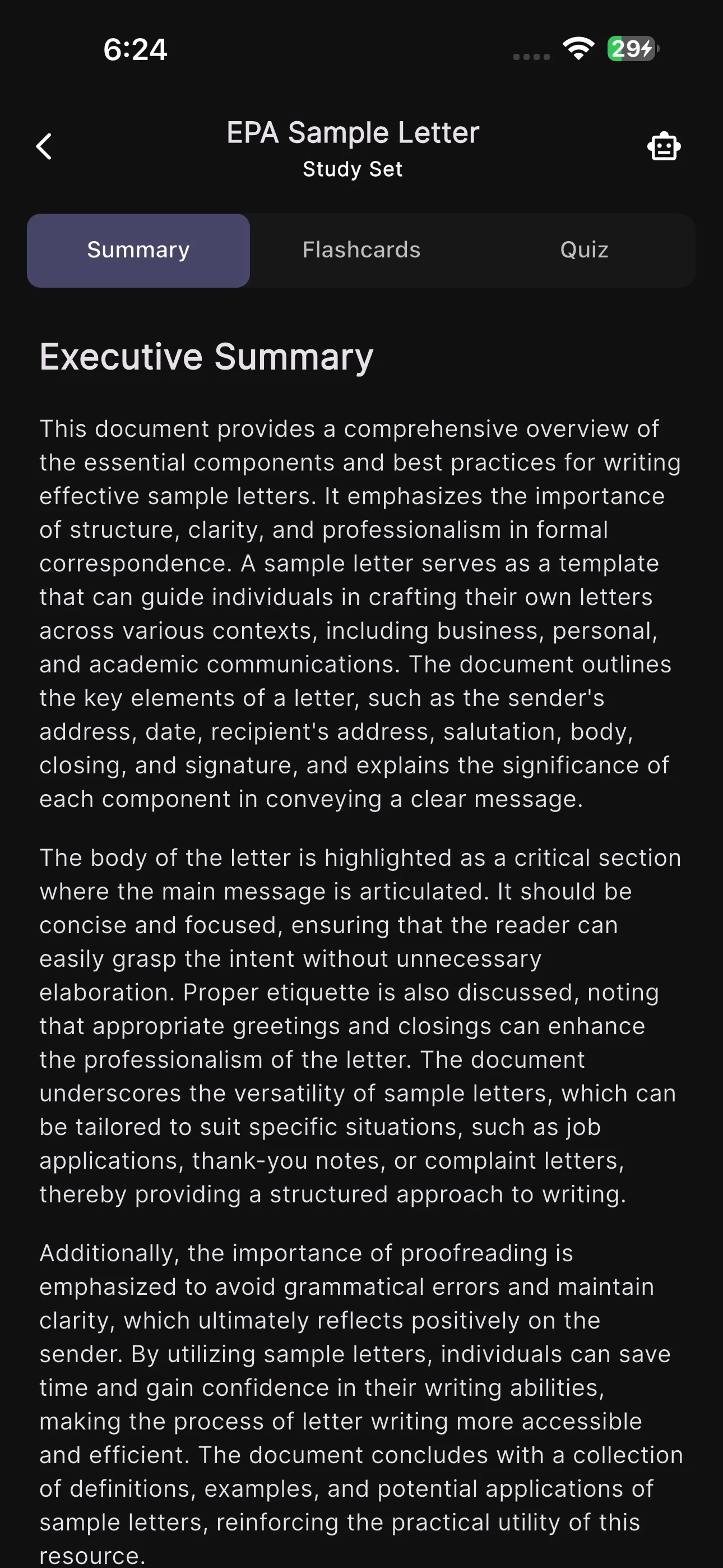
Step 3 — Assemble the master guide
Combine the per-source summaries into one document, grouped by topic. Because each summary is already structured, this is mostly copy, paste, and reorder — not rewriting. Add a short “high-yield” section at the top for the things you keep getting wrong.
Step 4 — Attach the practice material
Keep the flashcards and quizzes each source generated. Your study guide is now a summary and a question set — the read part and the test-yourself part in one place.
Turning the guide into active practice
A guide you only read is a guide you’ll forget. Convert it into retrieval practice:
- Run the flashcards on a spaced-repetition schedule so reviews land right before you’d forget.
- Take the quizzes per topic to find weak spots, then re-drill those specifically.
- Self-explain the high-yield section out loud without looking — the fastest way to expose gaps.
See how to study from recorded lectures for the research-backed protocol behind this.
Keeping it accurate
AI summaries are a fast first draft, not gospel. Before you rely on the guide:
- Spot-check facts against your notes or textbook, especially numbers, dates, formulas, and definitions.
- Fill gaps the AI missed — if a key topic from the syllabus isn’t represented, add it.
- Cut the noise — delete anything off-topic so the guide stays tight.
Ten minutes of review turns a generated draft into a guide you can trust.
Common mistakes
- Uploading everything at once → an unstructured mega-summary. Do it source by source, then assemble.
- Never testing yourself → you built a nice document and learned nothing. The flashcards and quizzes are the point.
- Trusting every fact blindly → verify the details that matter.
- Making the guide once and never revisiting → schedule reviews; retention comes from repetition, not from the act of making the guide.
FAQ
Can AI make a study guide for me?
Yes. Upload your lectures, PDFs, and notes to a tool like Studr and it generates structured summaries, flashcards, and quizzes. You combine the summaries into your master guide — minutes of assembly instead of a weekend of writing.
Is an AI study guide accurate?
Mostly, but verify. AI summaries are an excellent first draft; always spot-check facts, numbers, and definitions against your source material before relying on them for an exam.
What sources can I use?
Recorded lectures (audio), PDF slides and textbook chapters, your typed or photographed notes, and YouTube videos all work. Only use material you’re permitted to upload — check your course policy on professor-provided content.
How is this different from making flashcards?
Flashcards are one part of it. A study guide combines the condensed summary (the read-through) with the flashcards and quizzes (the practice). See how to turn your lecture notes into flashcards for the flashcard-only workflow.
How far ahead of the exam should I build it?
As early as possible — ideally building it incrementally through the term so spaced repetition has time to work. A guide assembled the night before can only be crammed, not retained.
The bottom line
The slow part of a study guide was never the studying — it was the assembling. Let AI condense and organize each source, keep the flashcards and quizzes it generates, verify the details, and drill with spaced repetition. Try Studr free — your first upload is free.
Related reading: the best AI note-taking app for students and AI note-taking apps with flashcards for active recall.