Best AI Note-Taking App for Law Students (2026)

Law school is a note-taking problem before it’s anything else. The reading volume is brutal, lectures move fast through doctrine, and everything eventually funnels into one outline you’ll live or die by at exams. Generic note apps weren’t built for that. This guide covers what a law student actually needs from an AI note-taker, and the tools that deliver it in 2026.
Quick answer: for turning lectures and dense readings into flashcards, quizzes, and structured summaries you can revise from, Studr is the strongest all-round fit. For pure transcription of multi-speaker seminars, pair it with a dedicated transcription tool.
On this page:
- Why law school breaks generic note apps
- What to look for
- The stack we recommend
- A realistic weekly workflow
- FAQ
Why law school breaks generic note apps
Three things make legal study unusual:
- Volume. A single week’s reading can run to hundreds of pages of cases and statutes. Passive re-reading doesn’t scale.
- Structure. Everything reduces to the same shape — issue, rule, application, conclusion — and eventually to a course outline. Notes that don’t map to that structure create rework.
- Recall under pressure. Exams reward fast, accurate retrieval of rules and their exceptions. That’s an active-recall problem, and most note apps stop at capture.
A note app that only records or only stores text solves the easy 30%. The hard 70% — converting reading and lectures into something you can drill — is where the right tool earns its place.
What to look for
- Handles PDFs, not just audio. Most of law school is reading. A tool that can’t ingest a PDF case or chapter is missing your primary source.
- Generates flashcards and quizzes. Rules, elements, and exceptions are exactly what spaced-repetition flashcards are built for.
- Structured summaries. Output organized by concept beats a wall of transcript — closer to the issue/rule/application shape you’ll outline anyway.
- Spaced repetition. Retention across a whole semester until finals is the entire game. See how to study from recorded lectures.
- Fast turnaround. With this much material, minutes per source matters.
The stack we recommend
1. Studr — best all-round for exam prep
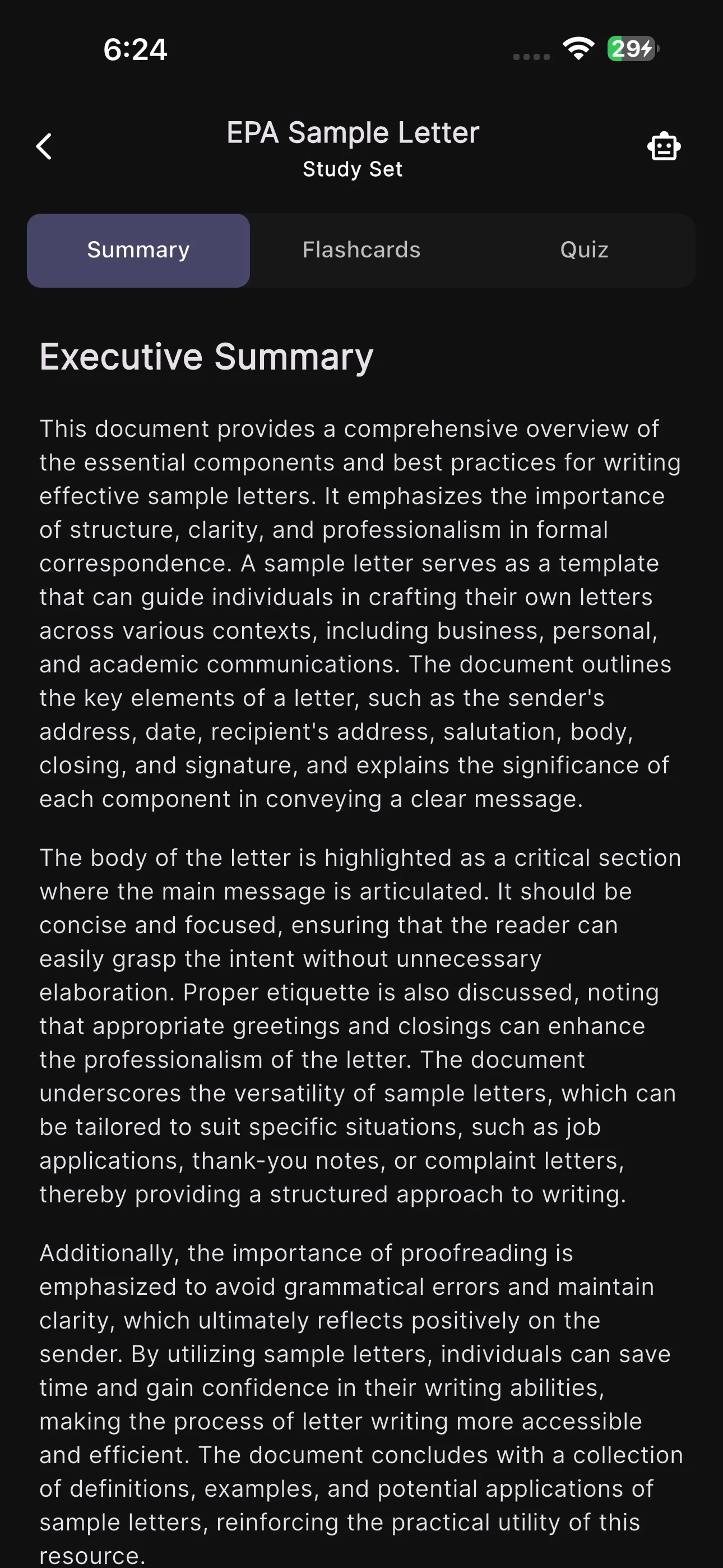
Studr ingests recorded lectures, PDF readings, and YouTube explainers, returns a structured summary, and generates flashcards plus a quiz from each — with spaced repetition built in. For a law student, that means a case reading becomes a set of rule-and-exception cards automatically, and a doctrine lecture becomes a quiz you can retake before finals.
- Best for: turning readings and lectures into drillable material
- Pricing: one free upload to try it, then $14.99/month, or $89.99/year (about $7.50/month)
- Trade-off: record-then-process, not live transcription; multi-speaker labelling is basic
2. A dedicated transcription tool — for multi-speaker seminars
If your seminars are heavy discussion with many voices, a transcription specialist with strong speaker labelling captures who-said-what more cleanly. Use it for the transcript, then feed that into your study tool. See Studr vs Otter for how that split works.
3. NotebookLM — for synthesizing across many sources
When you’re pulling a memo or paper together from multiple cases and articles, a source-grounded Q&A tool is useful for synthesis. It’s weaker on active recall, so it complements rather than replaces a flashcard tool — more in NotebookLM alternatives for students.
4. An outlining app you already like
Your master outline can live in whatever you’re comfortable with. The point isn’t the outline app — it’s feeding it from tools that have already done the summarizing and testing for you.
A realistic weekly workflow
- Before class: drop each assigned reading (PDF) into Studr → get a structured brief and a starter deck of rule cards.
- In class: record the lecture (or take light notes); you’re not trying to transcribe every word.
- After class: upload the recording → summary + flashcards + quiz. Merge the new cards with the reading deck.
- Across the semester: run spaced repetition a few times a week so rules stay fresh instead of being crammed.
- Before finals: retake the auto-generated quizzes per topic to find weak spots, then drill those.
The result is an outline and a deck that have been building since week one — not a panicked reconstruction in reading week.
FAQ
What’s the best AI note-taking app for law students?
For most law students, Studr is the strongest all-round choice because it turns both readings (PDFs) and lectures (audio) into structured summaries, flashcards, and quizzes with spaced repetition. Pair it with a dedicated transcription tool if your seminars are multi-speaker.
Can AI help with case briefs?
Yes — feeding a case PDF into a tool like Studr produces a structured summary you can shape into an issue/rule/application brief, plus flashcards for the holding and key rules. Always check the output against the source; AI summaries are a starting point, not a substitute for reading the case.
Is it ethical to use AI note-takers in law school?
Using AI to summarize your own notes and generate study flashcards is generally fine, but rules vary by school and by assessment. Never submit AI-generated work as your own, and check your institution’s academic-integrity and course policies before uploading professor-provided materials.
Do these tools work for bar exam prep?
The same approach — convert dense material into flashcards and quizzes, then use spaced repetition — is well suited to bar prep, where retention across a huge syllabus is the challenge. See the best AI note-taker for medical students for a deep dive on the same high-stakes-exam workflow.
Should I use one app or a stack?
Most students do best with a small stack: one tool to generate study material (Studr), optionally a transcription specialist for multi-speaker sessions, and an outlining app you like. Avoid spreading across too many tools — the friction cancels the benefit.
The bottom line
Law school punishes passive review and rewards structured, repeated recall. A note app that only captures leaves the hard part to you; one that turns readings and lectures into flashcards, quizzes, and summaries does the heavy lifting so you can spend your time actually retrieving the law. Try Studr free — your first readings and lectures are included.
Related reading: best AI note-taking app for students and best free AI note-taking apps for students.