Studr vs Otter.ai: I Used Both for a Month (2026 Verdict)

Quick verdict: if you’re a student and your goal is to study from lectures, Studr is the better fit — it generates flashcards and quizzes from the same recordings Otter only transcribes. If your goal is high-accuracy transcription of multi-speaker conversations, Otter is still the gold standard.
Both tools start from the same input — audio of someone talking — but they finish in completely different places. Otter hands you a transcript. Studr hands you something you can revise from the night before an exam. That single difference decides which one is right for you, and this guide walks through exactly where the line falls.
On this page:
- Side-by-side comparison
- Where each one wins
- The real workflow difference
- Hidden costs
- Which one should you pick?
- FAQ
Side-by-side
| Feature | Studr | Otter.ai |
|---|---|---|
| Transcription accuracy (single speaker) | High | High |
| Transcription accuracy (multi-speaker) | Good | Excellent |
| Auto-generated summary | ✅ Structured (concepts, definitions, examples) | ✅ Brief outline only |
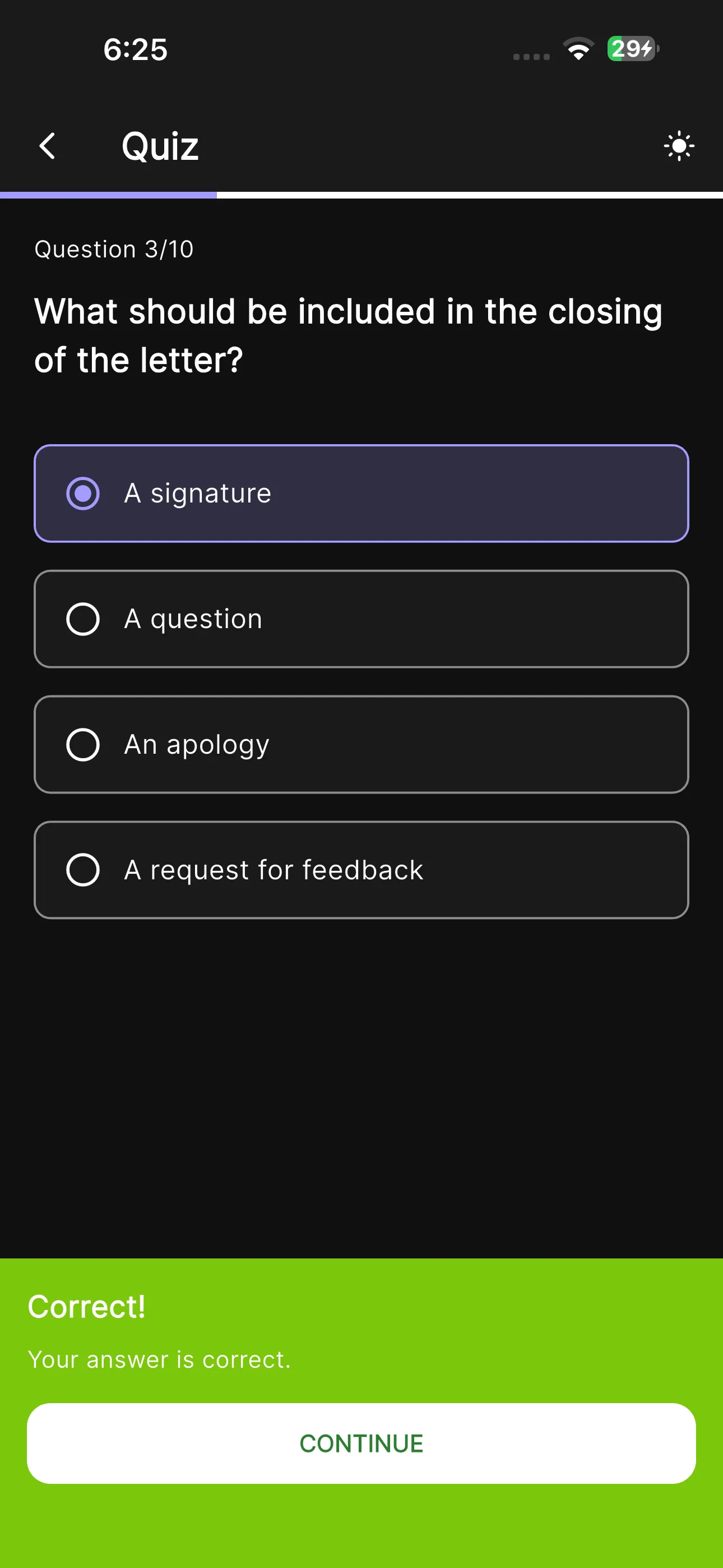
| Flashcards from content | ✅ Built-in | ❌ Not supported |
| Quiz generation | ✅ Built-in | ❌ Not supported |
| Spaced-repetition scheduling | ✅ Built-in | ❌ Not supported |
| PDF ingestion | ✅ Yes | ❌ Audio only |
| YouTube URL ingestion | ✅ Yes | ❌ Audio only |
| Real-time transcription in live calls | ❌ Record-then-process | ✅ Zoom/Meet/Teams |
| Multi-speaker labelling (diarization) | Basic | ✅ Best-in-class |
| Free tier | One free upload to try everything | 300 transcription minutes/month |
| Paid tier | $14.99/mo ($7.50/mo billed yearly) | $16.99/mo (Pro) |
| Built for | Students | Business / sales / journalists |
The pattern is clear before you read another word: Otter’s green checks cluster around capturing speech; Studr’s cluster around learning from it.
Where each one wins
Studr wins for exam prep
Auto-generated flashcards and a quiz on every lecture, scheduled for spaced review. This is the gap Otter has never tried to fill. The learning science here is well established — the testing effect shows that actively recalling material beats re-reading it, and spaced repetition schedules that recall for maximum retention. A transcript gives you neither; it just gives you the lecture again, in text.
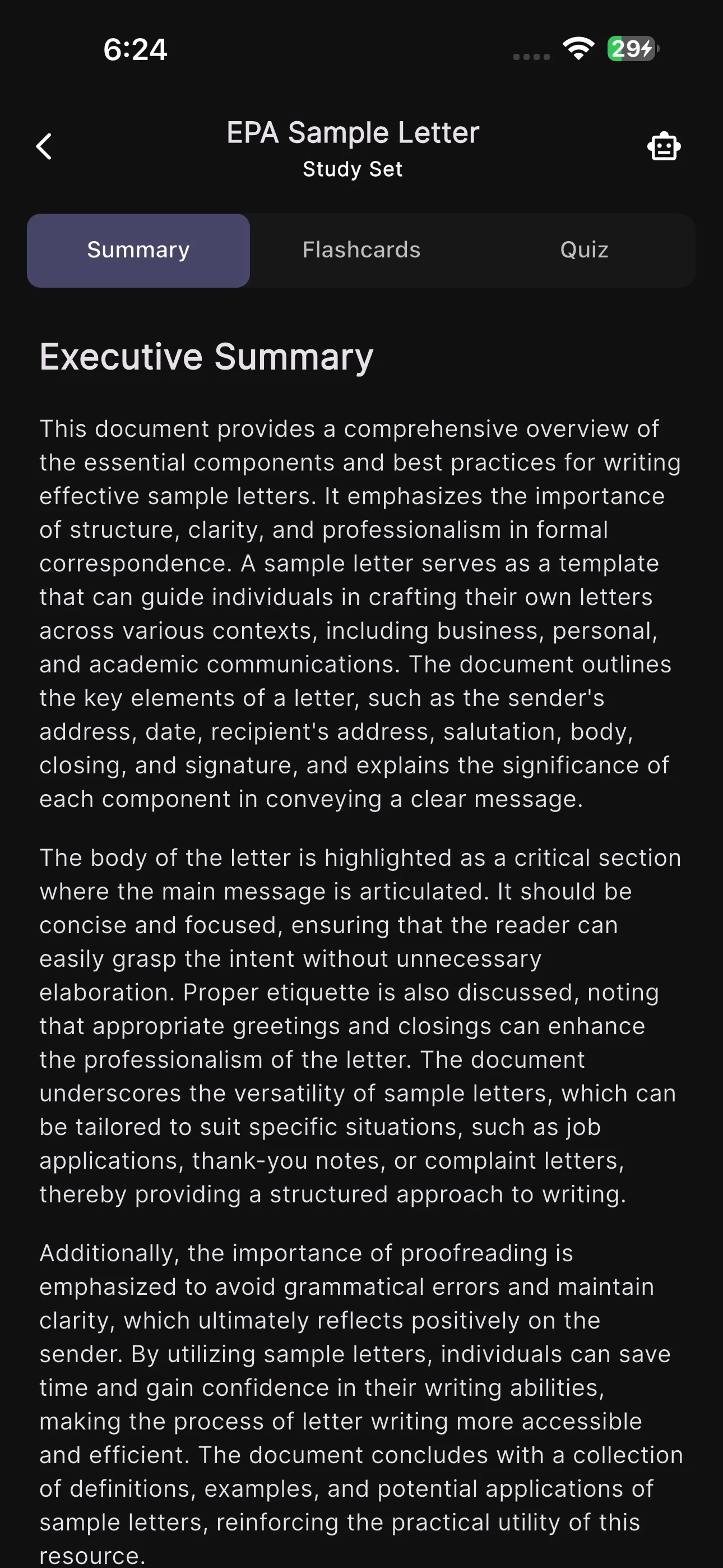
Studr wins for multi-source studying
PDF textbook chapters, YouTube review videos, recorded lectures — same workflow, same output format. Otter can only ingest audio, so a PDF chapter or a YouTube revision video simply can’t enter its pipeline. If your revision pulls from more than one type of source, that’s a hard wall.
Studr wins on single-speaker lectures and price
A professor lecturing for 90 minutes is Studr’s core case — the structured output is far more useful than a raw transcript. And at $14.99/month — or $89.99/year, which works out to about $7.50/month — versus Otter’s $16.99/mo Pro tier, it’s built for a student budget, with one free upload to test the full workflow before paying.
Otter wins for multi-speaker conversations
Otter’s speaker diarization is best-in-class — it labels “Speaker 1”, “Speaker 2” accurately, which matters for journalism, research interviews, and group projects. If your “lectures” are really seminars or panel discussions with several voices, Otter’s transcript will be cleaner.
Otter wins for live and searchable capture
Otter integrates with Zoom, Google Meet, and Teams for real-time transcription during a live call — Studr is record-then-process. And if you need a fully searchable archive of every meeting you’ve attended, Otter’s keyword search, timeline UI, and mature collaboration features (shared workspaces, comments, real-time editing) are years ahead.
Where they tie
Both use modern speech-to-text engines, so single-speaker English transcription accuracy is comparable for a standard lecture. Both ship iOS, Android, and web apps — the UX is a wash, with Otter surfacing more features up front and Studr staying cleaner.
Real workflow comparison — same lecture, both tools
Imagine you’ve just recorded a 60-minute pathology lecture.
Otter workflow:
- Open Otter, upload audio
- Get transcript ~5 minutes later
- Read transcript (~5,000 words) and pick out what’s important — 30–40 minutes
- Open Anki, type ~50 flashcards manually — 25 minutes
- Total time before you can start studying: ~70 minutes
Studr workflow:
- Open Studr, paste recording
- Get structured summary + flashcards ~2 minutes later
- Read summary (~600 words) — 5 minutes
- Run flashcards once — 10 minutes
- Total time before you’ve already done your first active-recall pass: ~17 minutes

This is the entire reason student-focused AI tools exist. The transcript isn’t the bottleneck — turning the transcript into something you can study from is. With Otter you finish where studying begins; with Studr you finish having already started.
Hidden costs
| Studr | Otter | |
|---|---|---|
| Time-to-first-study | ~2 min | ~70 min (with manual flashcards) |
| Anki / Quizlet subscription needed? | No | Optional but typical |
| Plan needed for >300 min/mo audio | Premium, $14.99/mo ($7.50/mo billed yearly) | $16.99/mo Pro required |
The sticker price isn’t the whole story. Otter’s transcription is only the first step of a student’s workflow, so its true cost includes the time — or the second subscription (Anki is free, but a Quizlet Plus habit isn’t) — needed to turn transcripts into study material.
When to pick Otter anyway
Three legitimate cases:
- You’re already an Anki power user with hundreds of decks, custom card types, and a workflow you don’t want to change. Otter feeds your existing pipeline well.
- Your “lectures” are really meetings or interviews with multiple speakers. Otter’s diarization wins.
- You need real-time transcription during the call. Otter has a desktop app that joins Zoom; Studr doesn’t yet.
When to pick Studr
Most students fall into at least one of these:
- You don’t already have an Anki habit and you’re not going to build one
- Your study material is a mix of recorded lectures, PDF textbooks, and YouTube reviews
- You want flashcards and quizzes generated automatically, not built by hand
- The Otter Pro pricing is more than your study budget allows
Which one should you pick?
| Your situation | Best pick |
|---|---|
| Exam-heavy program (pre-med, med, law, MBA) | Studr |
| You already have a deep Anki habit | Otter → Anki manually |
| Interviews / group projects with many speakers | Otter |
| Study material spans audio, PDFs and YouTube | Studr |
| You need a live, searchable meeting archive | Otter |
Try Studr free — your first upload is free; no card required.
FAQ
Is Studr or Otter more accurate?
For a single speaker in clear English — a typical lecture — accuracy is comparable; both use modern speech-to-text. For multiple speakers talking over each other, Otter’s diarization is more accurate. Studr’s advantage isn’t the transcript, it’s what it builds from the transcript.
Can Otter make flashcards or quizzes?
No. Otter produces transcripts and brief outlines only. To get flashcards you’d export the transcript and build cards manually in Anki or Quizlet. Studr generates flashcards and a quiz automatically from each recording.
Does Studr work with PDFs and YouTube videos?
Yes. Studr ingests audio recordings, PDF textbook chapters, and YouTube URLs, and produces the same structured summary, flashcards, and quiz for each. Otter is audio-only. See how to transcribe a YouTube lecture and turn any PDF textbook into flashcards.
Which is cheaper for a student?
Studr Premium runs $14.99/month, or $89.99/year (about $7.50/month), with one free upload so you can test it first. Otter’s Pro tier is $16.99/mo, and its free tier caps at 300 transcription minutes — roughly a few long lectures. Factor in that Otter users often also pay for a separate flashcard tool.
Is Otter ever the better choice for a student?
Yes — if you’re already a committed Anki user with a pipeline you like, if your recordings are multi-speaker discussions rather than lectures, or if you need real-time transcription during a live Zoom call.
The bottom line
Otter is a transcription company; Studr is a study company. They can take the same lecture audio as input and still be solving different problems. If your goal is “I need a clean, searchable record of what was said,” Otter wins. If your goal is “I want to actually remember this by next week’s exam,” pick the tool that includes the recall step. Try Studr free.
For a wider look across more competitors, see 5 Otter alternatives built for students, Studocu vs Otter.ai vs Studr, and if you’re in a heavy-memorization program, the best AI notetaker for medical students goes deeper on exactly this trade-off.