How to Summarize a 2-Hour Lecture in 30 Seconds with AI

If you’ve ever sat through a 2-hour lecture, gone home, and realised you remember exactly nothing — you’re not lazy. You’re human. Working memory caps out around 20 minutes of dense input. Everything after that leaks.
The fix isn’t grinding harder. It’s letting an AI do the boring half so you can focus on the part that actually builds knowledge: active recall. Here’s the exact workflow to summarize any lecture with AI, plus how to make sure the summary is actually accurate.
On this page:
- The 4-step workflow
- How AI actually summarizes a lecture
- How accurate are AI lecture summaries?
- Why this beats traditional note-taking
- FAQ
Step 1 — Record once, anywhere
Open Studr, hit record at the start of class. That’s it. Phone in your pocket is fine — modern transcription handles muffled audio surprisingly well. No special mic needed. (If you want to set up your iPhone for the cleanest possible recordings, see our guide to recording lectures on iPhone the right way.)
If your lecturer posts recordings later, you can upload an MP3, MP4, or even a YouTube link instead. Same result.
Step 2 — Get a structured summary, not a wall of text
A raw transcript is useless. 12,000 words of “umm” and “as I was saying” is worse than no notes at all.
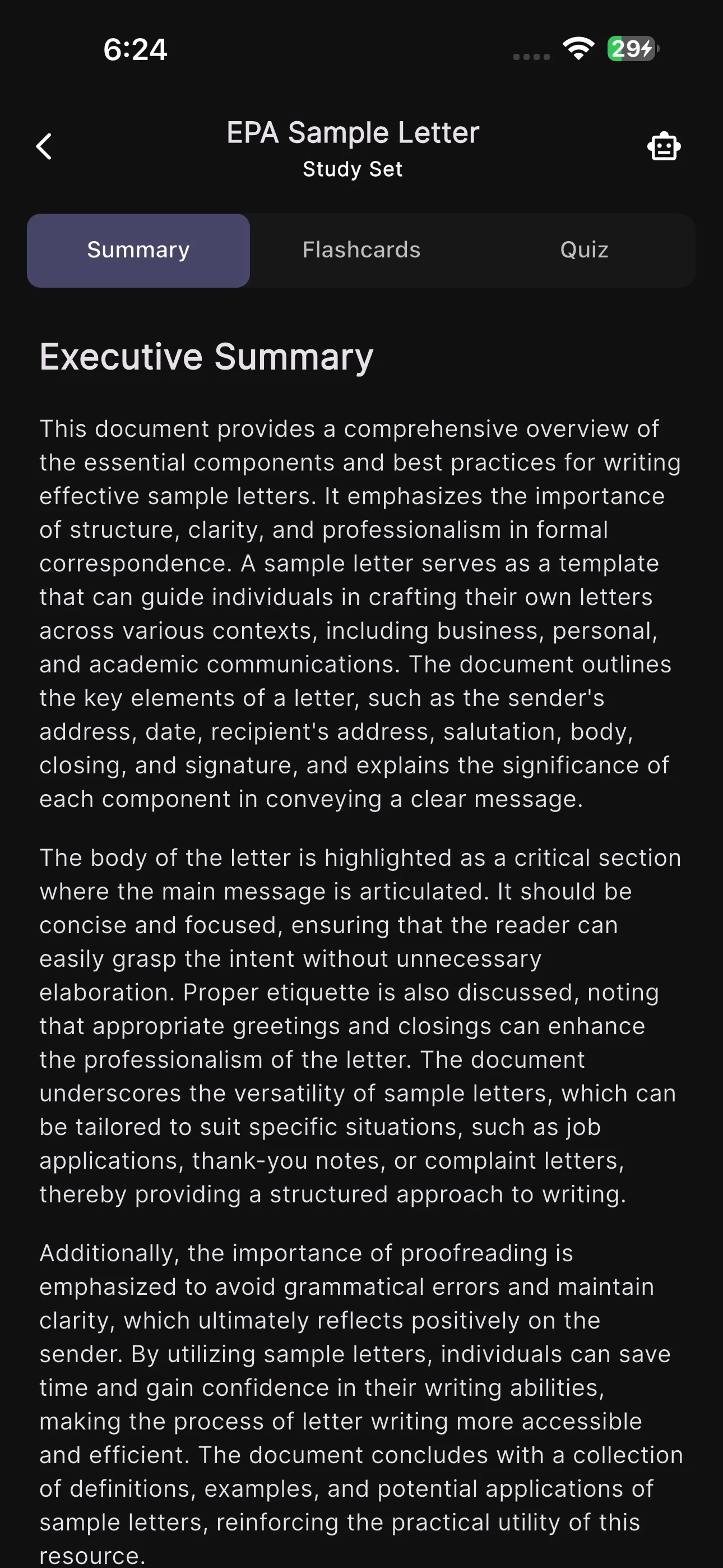
Studr breaks the lecture into:
- Key concepts — the 3–7 ideas the lecturer actually built the lesson around
- Definitions — every term they defined, in the exact wording they used
- Examples — every worked example, kept verbatim because examples are how you’ll be tested
- Open questions — things the lecturer said “we’ll come back to” (you won’t, but the AI flags them)
Step 3 — Auto-generate flashcards
This is where 90% of the learning happens. Active recall — forcing your brain to retrieve information — is roughly 2× more effective than re-reading, according to the 2013 Dunlosky meta-analysis on study techniques.
Tap “Flashcards” on the summary. You get 15–30 cards, each one a question pulled from a real concept in the lecture. Spaced-repetition schedules them automatically. (You can do the same thing with a PDF textbook — see how to turn any PDF into flashcards.)
Step 4 — Quiz yourself before the exam
Multiple-choice plus short answer, generated from the same lecture. The trick: take the quiz a week before the actual exam, not the night before. The retrieval gap is what cements memory.
How AI actually summarizes a lecture
Under the hood it’s two steps. First, speech-to-text transcribes the audio into raw text with timestamps. Then a language model does what a good student would: it identifies the lecture’s structure, groups related points, pulls out defined terms and worked examples, and discards the filler. The result isn’t a shorter transcript — it’s a reorganized one, arranged by concept instead of by the order words happened to come out.
That reorganization is the value. A transcript is chronological; an exam is conceptual. The summary bridges the two.
How accurate are AI lecture summaries?
Very good, but not infallible — treat the summary as a strong first draft, not gospel. Three quick checks before you rely on it:
- Numbers and names. Dates, formulas, drug names, and citations are where transcription slips most. Spot-check them against your own notes or the slides.
- Technical jargon. If your subject has unusual terminology, glance through the definitions to confirm the AI heard them correctly.
- Anything the lecturer stressed as “on the exam.” Make sure it made the summary; if not, add it.
Two minutes of review turns a 95%-accurate draft into notes you can trust.
Why this beats traditional note-taking
Note-taking during a lecture splits your attention: you’re transcribing instead of understanding. Multiple studies (Mueller & Oppenheimer, 2014) show students who take fewer notes but listen actively score higher on conceptual questions. For the deeper research-backed protocol on what to do AFTER class, see how to study from recorded lectures.
Let the AI transcribe. You listen.
FAQ
Can AI really summarize a 2-hour lecture accurately?
Yes — AI transcribes the full recording and reorganizes it into a structured summary (concepts, definitions, examples) in under a minute. Accuracy is high for clear speech; spot-check numbers, names, and technical terms against your notes.
What’s the best AI tool to summarize lectures?
For students, Studr is purpose-built: it records or accepts audio (and PDFs and YouTube links), returns a structured summary, and also generates flashcards and a quiz. See the best AI note-taking app for students for the full comparison.
Can I summarize a lecture I recorded on my phone?
Yes. Upload the audio file (MP3, M4A, MP4) or record directly in the app. For the cleanest results, see how to record a lecture on iPhone the right way.
Is it better to take notes or let AI summarize?
Research shows transcribing during class hurts comprehension because it splits your attention. Letting AI capture and summarize frees you to listen actively, then study from the structured output afterward — which is where retention actually comes from.
How long does it take?
About 30–60 seconds to process a 2-hour recording into a structured summary, plus a couple of minutes to review it for accuracy.
Try it free
Download Studr for iOS or Android. Your first upload is free — no card required.